FAQ: Windows
Find answers to Windows-related questions from our customers.
Table of contents
Can I use Windows 10 Enterprise LTSB/LTSC product keys to activate Windows 11 Pro?
Can I use your licenses in order to upgrade my Windows 10 Home to Windows 11 Pro?
Can I install the Windows offered by your e-shop on a computer which does not have any operating system currently?
Yes, you can. For more information, please see our installation guides in Academy.
Can I install and activate Windows 11 on a computer which doesn’t meet the minimum system requirements?
Yes, it’s possible but Microsoft recommends against it as the operating system won’t be supported on such a device – it is an action that only customers with advanced technical knowledge should undertake and only at their own risk.
Can I make a direct upgrade from Windows 10 Enterprise LTSB/LTSC to Windows 11 Pro (and keep all my files and folders)?
No, you cannot. There is no in-place upgrade path from Windows 10 Enterprise to Windows 11 Pro. You have to download an installation file and make a clean installation which it entirely deletes and replaces the existing operating system.
Can I use Windows 10 Enterprise LTSB/LTSC product keys to activate Windows 11 Pro?
No, you cannot. Windows 11 Pro can only be activated with either a Windows 10 Pro key, or a Windows 11 Pro key. Take into account that activation keys for both Windows 10 Enterprise LTSB/LTSC and Windows 10 Pro are always provided to our customers.
Can I use your licenses in order to upgrade my Windows 10 Home to Windows 11 Pro?
Yes, but additional mid-step is required. You cannot upgrade your Windows 10 Home to Windows 11 Pro directly – first you will need to convert your Windows 10 Home into Windows 10 Pro. Once it’s done, you can proceed with the Windows 11 upgrade.
How do I fix the VCRUNTIME140.dll missing error?
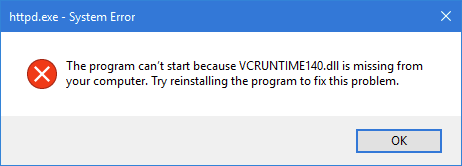
This error is fixed by installing the latest Microsoft Visual C++ package or repairing the launcher. You can download the latest packages here.
Can Office 2013/2016/2019/2024 run on my current Windows?
Check the compatibility of Office and Windows in the table below:
Windows 11 | Windows 10 | Windows 8.1 | Windows 7 | |
|---|---|---|---|---|
Office 2024 | ✔ | ✔ | ||
Office 2021 | ✔ | ✔ | ||
Office 2019 | ✔ | ✔ | ||
Office 2016 | ✔ | ✔ | ✔ | ✔ |
Office 2013 | ✔ | ✔ | ✔ |
For more detailed information, visit Microsoft 365 and Office Resources.
Note: it may be possible to install Office 2013 on Windows 11, but it is not an officially supported combination, so there’s no guarantee for smooth performance.