Why should you buy CAL Suites instead of separate CALs?
Licensing of Microsoft server products can be quite complex – beside acquiring the correct type and number of licenses for the server configuration itself, you also need to have an appropriate amount of client-access licenses (CALs) for all the users or devices that will access the server and its services. To simplify licensing and reduce costs significantly, you should consider getting MS CAL Suites instead of separate CALs for each server product in your company.
CAL Suites vs separate CALs: how much can you save?
A CAL Suite provides usage rights that are equivalent to multiple CAL licenses for many different server products. Thanks to bundle licensing, CAL Suites can be obtained at significantly more attractive prices than the corresponding number of separate CALs needed for the same server setup.
Take a look at the following price comparison for a popular server infrastructure:
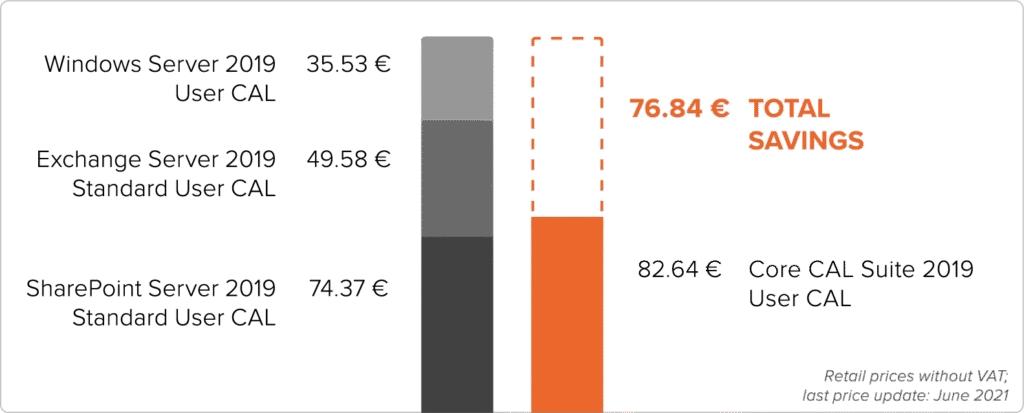
This graph shows savings per 1 user.
Purchasing one Core CAL Suite is 48% CHEAPER than acquiring the equivalent individual CALs for each server product!
Core vs Enterprise CAL Suite: which one is right for you?
You can choose between two editions – Core CAL Suite and Enterprise CAL Suite. The only difference between them is what server products and services they give access rights to, so you can select the right one for the needs of your company’s server infrastructure.
Core CAL Suites contain:
Windows Server CAL
Exchange Server Standard CAL
SharePoint Server Standard CAL
Microsoft Endpoint Configuration Manager Client ML
System Center Endpoint Protection Client ML
Enterprise CAL Suites contain:
All components of the Core CAL Suite +
Exchange Server Enterprise CAL
SharePoint Server Enterprise CAL
Windows Server Active Directory Rights Management Services CAL
Advanced Threat Analytics Client ML
Microsoft Audit and Control Management Server CAL
Note: One CAL Suite can be assigned to just one user or device.
CAL Suites FAQ
Basics
What is a CAL?
A Client Access License (CAL) is a document confirming access rights, which is required during a software audit as proof that a server product is properly licensed in terms of the number of users and devices that have been granted access. It is not a software product of any sort, so it does not need to be installed or deployed in any way.
What is a CAL Suite?
Similarly, a CAL Suite is also a document but unlike a singular CAL which gives access rights to only one specific server product (e.g. a Windows Server 2019 User CAL only gives access to Windows Server 2019), a CAL Suite grants access to many server products and services at once (e.g. a Core CAL Suite 2019 User CAL gives access to Windows Server 2019, Exchange Server 2019, SharePoint Server 2019 and more).
In summary, CAL Suites are an indivisible* package of CALs that allow access to a variety of server products and services, which depend on the CAL Suite edition – Core or Enterprise.
*One CAL Suite can be assigned to just one user or one device – it cannot be split up among multiple users and devices.
What types of CALs are there?
There are two main types of CALs and CAL Suites:
User CAL – one user has access to the server and its services from an unlimited amount of devices. User CAL is a great choice if your employee wants to access the server from multiple devices.
Device CAL – one device has access to the server and its services and can be used by an unlimited number of users. Device CAL is a better choice if your employees share one device, for example on different work shifts.
User CAL and Device CAL can be mixed and used all together within one server structure. This option allows users to purchase a suitable amount of each type of CAL, depending on what fits the company server infrastructure best. Additionally, you only need one CAL per user/device per server product regardless of the number of servers.
Example: One Windows Server 2019 User CAL grants access to all Windows Server 2019 servers within a company or organization.
What are downgrade rights?
Downgrade is an end-user right to revert a software to an older version, offered by Microsoft for products purchased via their Volume distribution channel. Downgrade rights can also be applied to CALs and CAL Suites – for example, if you have an Exchange Server 2016 Standard, you can purchase an Exchange Server 2019 Standard User CAL and downgrade it to Exchange Server 2016 Standard User CAL. Unlike other products from the Volume channel, CALs and CAL Suites are fully backwards compatible – the latest CAL release can be used to allow access even to the oldest server versions.
Downgrade rights allow using an older version of a given product, but do not grant the right to change the edition or type of said product – e.g. Exchange Server 2019 Standard User CAL can become Exchange Server 2016 Standard User CAL, but it cannot become Exchange Server 2016 Enterprise User CAL.
Note: A Volume product with downgrade rights can be used in only one specific version at a given moment. This is valid for software products as well as all types of CALs.
Frequently asked questions from our customers
How many users or devices can one CAL Suite be used by?
One CAL Suite covers one user or one device.What does a Core/Enterprise CAL Suite contain?
Core CAL Suite: Windows Server CAL, Exchange Server Standard CAL, SharePoint Server Standard CAL, Skype for Business Standard CAL, Skype for Business Server Standard CAL, Microsoft Endpoint Configuration Manager Client ML, System Center Endpoint Protection Client ML.
Enterprise CAL Suite: all components of the Core CAL Suite listed above, plus: Exchange Server Enterprise CAL, SharePoint Server Enterprise CAL, Skype for Business Server Enterprise CAL, Windows Server Active Directory Rights Management Services CAL, Advanced Threat Analytics Client ML, Microsoft Audit and Control Management Server CAL.Do CAL Suites include an SQL CAL?
No, SQL CALs have to be purchased separately.How many servers can be accessed with a CAL Suite?
A CAL Suite covers a specified number of users or devices and provides access rights to any server within your organization.Are CAL Suites compatible with older server versions?
Yes, CAL Suites can be used for accessing servers with the same year of release or any of the older server versions.
Looking for a CAL solution tailored to your needs? Contact us!